
Deploy a Website Built with Claude Code
Claude Code builds the site but does not host it. Add ProductEcho over MCP, run one prompt and get a live HTTPS URL, then use your own domain.
Can Claude Code put a website online?
Not by itself. Claude Code writes and edits the files of your website, but it has no hosting, so the site stays on your computer until something publishes it. Add ProductEcho to Claude Code as an MCP server and one prompt is enough: the agent reads your project, uploads a clean copy, has ProductEcho build it when it needs a build, publishes it on a CDN and gives you a public HTTPS URL.
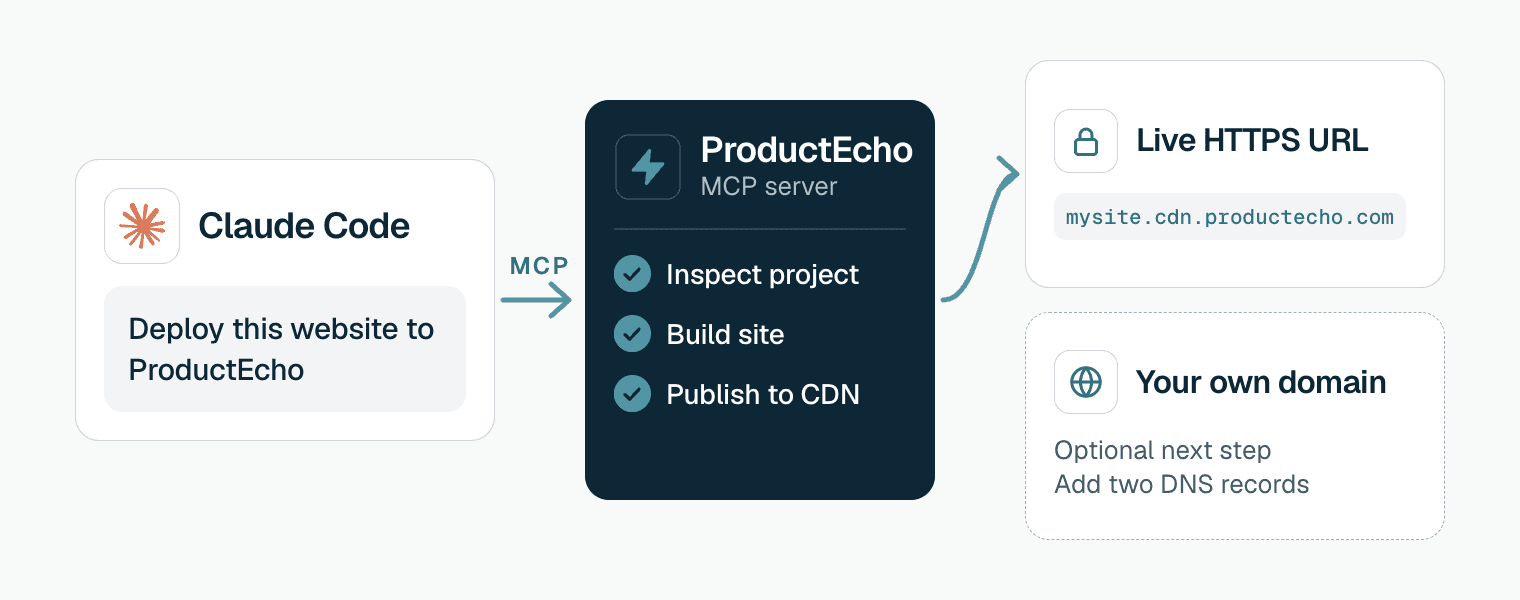
This page starts after the site is built. It covers landing pages, portfolios, documentation and marketing sites that run in the browser, and it is about publishing them, not about installing or using Claude Code itself. For a sample that is already live, see kura-spa.cdn.productecho.com, a Svelte and Vite site served from the CDN.
Which kind of site did Claude Code build?
A website can come out of Claude Code in several shapes. The first five below are published as static sites: the finished files are served from a CDN and no server code runs when someone visits.
| What Claude Code made | How ProductEcho publishes it |
|---|---|
Plain HTML, CSS and JavaScript: an index.html and its files | Published as it is. There is no build step. |
| Vite with React, Vue or Svelte | Built on ProductEcho with the project's build script, then the build output is published. |
| Astro | Built on ProductEcho. Astro writes dist, and that folder is published. |
Next.js with output: "export" in next.config | Built on ProductEcho. Next.js writes out, and that folder is published. If Claude Code has not set output: "export" yet, ask it to. |
| Create React App, Angular, SvelteKit with the static adapter | Built on ProductEcho, and the folder the build writes is published. |
| A project with server code: Next.js with server rendering or API routes, Astro with a server adapter, Express, a Python or Go backend | Runs as an app, not as a static site. See Deploy from Claude Code. |
The agent inspects the project and picks the kind for you. You can also say which you want, for example "deploy this as a static site". Either way the result is a public HTTPS address.
Connect Claude Code to ProductEcho once
If you have not done this yet, run these two commands in your terminal. They add the ProductEcho marketplace and install the plugin, which brings the deploy skills and the MCP server.
In a Claude Code session that is already open, run /reload-plugins. Then run /mcp and follow the steps in your browser to sign in. The consent covers workspace discovery, deployments and database management. Details and fixes are in Deploy from Claude Code. Using Cursor or Codex instead? Everything below works the same from them once they are connected.
Deploy the website with one prompt
Open your website's folder in Claude Code and run:
To run the skill by name, start the message with /productecho-plugin:productecho-deploy. A website needs no database, so there is no "with PostgreSQL" in this prompt. The agent picks a short name for the address, up to eight characters, and checks that it is free, so the site opens at an address like https://mysite.cdn.productecho.com. Claude Code asks for approval as it goes, and when the deploy finishes it prints the URL.
What the agent does during a deploy
Looks up your workspace
get_workspace_info to read your plan limits and the apps you already have.Inspects the project
inspect_application_source to find the framework and the folder the build writes, and to decide that this is a static site.Picks a free address
check_domain_availability for a short name, which becomes https://<name>.cdn.productecho.com.Uploads a clean copy of the code
node_modules, .git, build output, .env files and keys.Builds and publishes
deploy_application with the static CDN target. ProductEcho runs the build on its own servers when the project has one, then switches the site to the new version in one step.Waits for Ready
get_application_status until the site is Ready, then returns its HTTPS address. For a static site, Ready means the new version is being served from the CDN. It does not check your pages, so open the address and click through.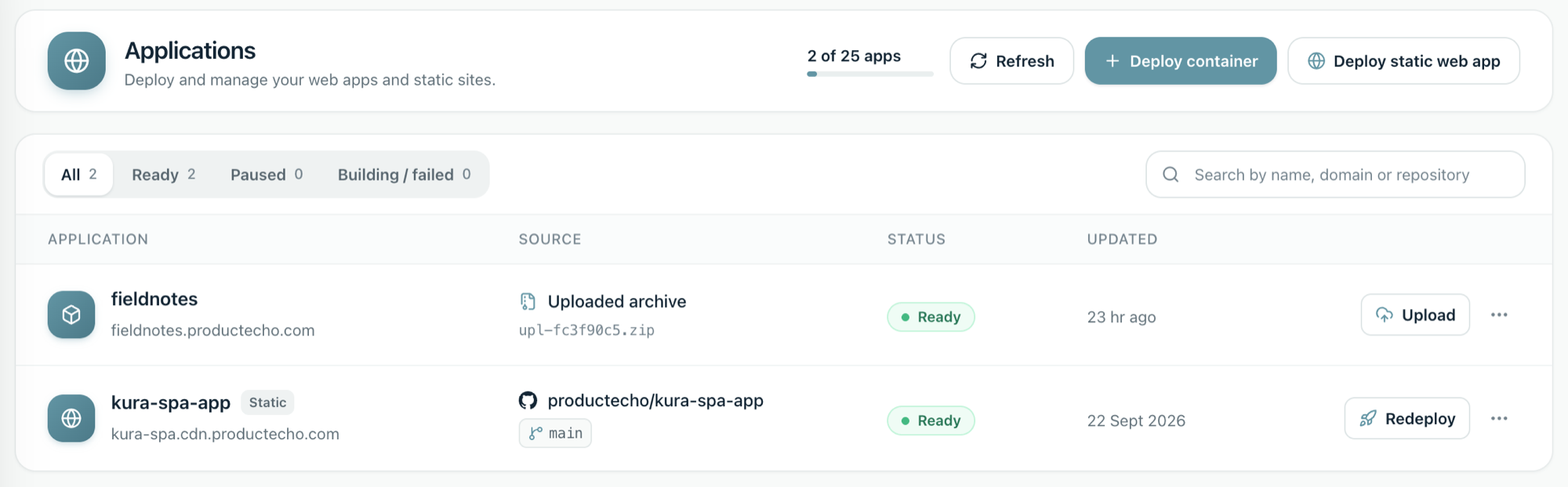
A deploy does not overwrite the live site while it builds. ProductEcho builds each version separately, switches to it in one step and checks it at the public address. If the build or that check fails, the version that was live keeps serving.
Use your own domain
Every static site gets a cdn.productecho.com address. To serve it from your own domain as well, ask the agent:
The agent calls add_custom_domain and gets two DNS records to publish. It cannot change your DNS, so it prints the records for you or for whoever manages your domain. For www.example.com they look like this:
The TXT record proves you own the domain and the CNAME sends visitors to the site. Some DNS providers want only the part before your domain as the name, such as www, and others want the full name. The agent gives both.
Ask the agent to add the domain
add_custom_domain and shows the two DNS records.Publish the records
Ask the agent to check
check_custom_domain. A domain only moves forward when it is checked, so the agent checks again until the domain goes from waiting for DNS, to HTTPS being set up, to active.Open your domain
https://www.example.com. The ProductEcho address keeps working too.Most DNS providers cannot put a CNAME on a root domain. Use an ALIAS or ANAME record, or CNAME flattening, with the same value, or publish the site on a www address instead.
Each site can have up to three custom domains, and the Free plan includes them. The plan limits are on the pricing page.
Update the site later
Change the site with Claude Code, then ask it to deploy again, for example "Redeploy this website to ProductEcho". The deploy skill keeps a small .productecho folder in your project that links it to the site, so a redeploy updates the same site.
When the site needs a server or a database
A static site has no server code of its own. If it has to save form submissions, sign people in or read from a database, deploy it as an app with PostgreSQL instead, using the prompt "Deploy this app to ProductEcho with PostgreSQL". Deploy from Claude Code walks through it, and PostgreSQL auto-provisioning shows what the database setup looks like.
Fix the common problems
The build failed
The build runs on ProductEcho with your project's own build script, so a build that fails on your machine fails there too. The status reason holds the build output. Ask Claude Code to read it, fix the project and deploy again. A build that succeeds but leaves no index.html in its output folder also fails. If your build writes to a different folder, tell Claude Code the folder name so it can pass it as the output directory.
The site shows a blank page or its files do not load
Check the base path first. Settings made for GitHub Pages, such as the Vite base option, the Next.js basePath option or the Astro base option, make the page ask for its files under a folder that does not exist at the root of your address. Ask Claude Code to remove the setting and deploy again.
The domain stays on waiting for DNS
Check that both records are published exactly as shown, then ask the agent to check again. A record that already exists at the same name with a different value has to be replaced.
The domain says it needs action
The agent relays the reason. The common ones:
- A CAA record on your domain blocks the HTTPS certificate. Remove it, or change it to allow Let's Encrypt and Google Trust Services.
- The certificate could not be validated. Make sure the CNAME is the only record for that name.
- The domain is already connected to another app or account. If it is yours, remove it from there first.
Claude Code cannot find ProductEcho
Run /reload-plugins or restart Claude Code, then follow the fixes in Deploy from Claude Code.
Questions
Can Claude Code host a website by itself?+
No. Claude Code builds and edits the files but does not serve them to the public, so you need a host. ProductEcho gives the site a public HTTPS address from the same session.
Do I need GitHub to publish a website built with Claude Code?+
No. The agent uploads a zip of your project, so you do not need a repository. If the code is on GitHub, ProductEcho can also build it from the repository address.
Is it free?+
There is a free plan and no credit card is needed to start. The Free plan includes custom domains, and the pricing page lists the limits.
Can I use my own domain?+
Yes. A static site can have up to three custom domains. You publish two DNS records, a TXT record that proves you own the domain and a CNAME that points to ProductEcho, and the HTTPS certificate is set up for you.
Can I deploy a Claude artifact or a Claude Design export?+
Yes, if it is HTML. Save it as index.html in an empty folder, open the folder in Claude Code and run the same prompt. A React artifact is not a website yet: ask Claude Code to wrap it in a Vite project first.
Should I use Vercel, Netlify or GitHub Pages instead?+
They also publish static sites, usually from a Git repository. This page covers the route where Claude Code does the deploy for you over MCP, with no repository to set up and no deploy settings to fill in. The best MCP deployment platform page compares platforms that have MCP servers.
Does this work from Cursor or Codex?+
Yes. ProductEcho is a standard remote MCP server, so the deploy works from any client that supports one. Cursor and Codex each have their own setup guide.