
Deploy a GitHub Repo and Rebuild It on Every Push
Connect a GitHub repo, pick a branch, and ProductEcho builds and deploys it. Every push rebuilds the app, and Redeploy latest does the same on demand.
Can ProductEcho build and deploy straight from GitHub?
Yes. Connect a repository, pick a branch, and ProductEcho builds the code and deploys it to a public HTTPS URL, with no zip upload. Public and private repositories both work. After the first deploy, every push to that branch builds a new version and rolls it out, and a Redeploy button does the same whenever you want it.
You can start from the console or from an AI agent. Both end in the same place: an app whose source is a repository and a branch.
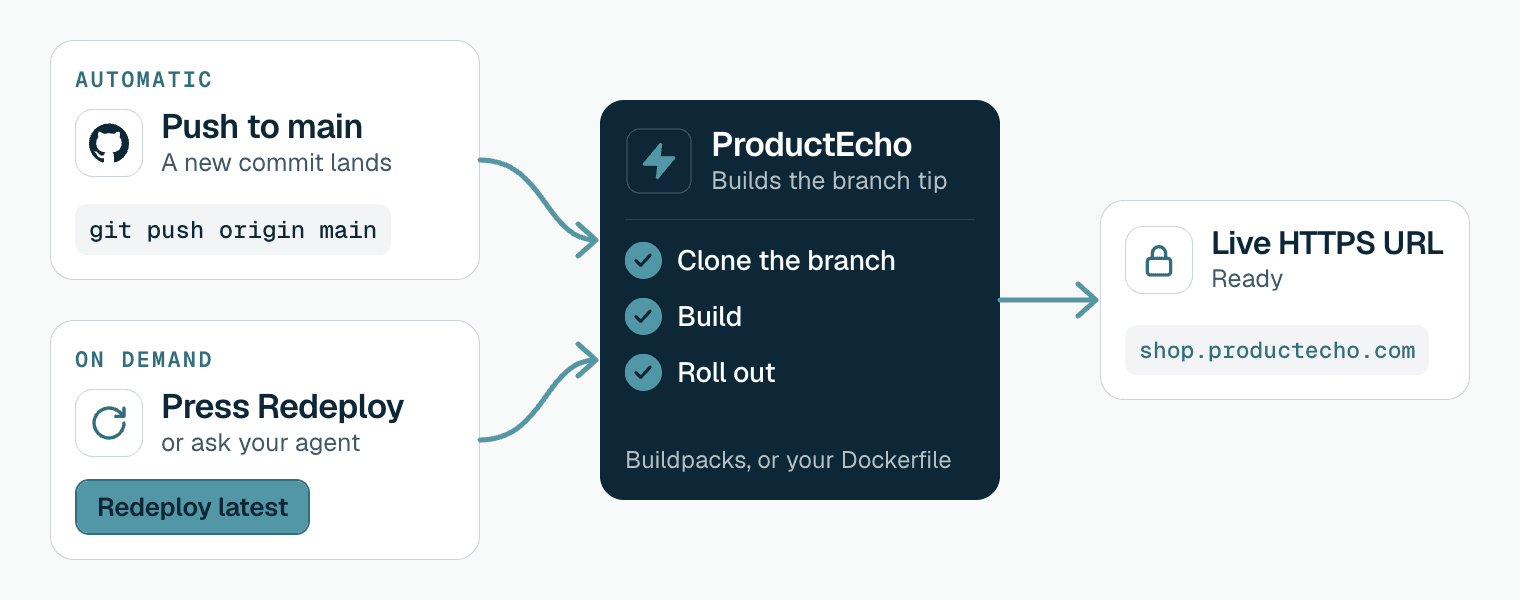
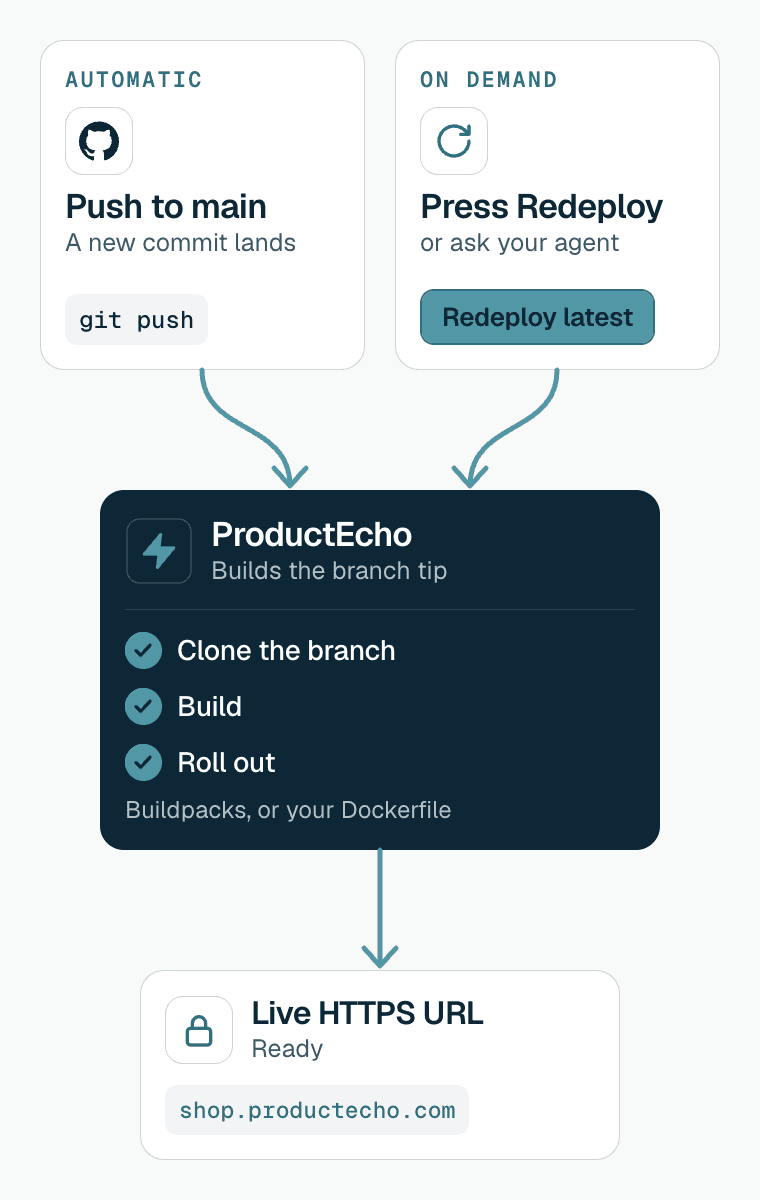
| A new version goes live when | What starts it | What it needs |
|---|---|---|
| You push to the branch | You run git push. GitHub tells ProductEcho, and ProductEcho builds and deploys. | Auto-deploy on, and the ProductEcho GitHub App installed on the repository |
| You redeploy by hand | Redeploy in the console, or a request to your agent. ProductEcho pulls the latest commit of the branch. | Nothing else. It works with auto-deploy off. |
| You deploy the first time | Connecting the repository in the console, or asking your agent. | A ProductEcho account, and for a private repository the GitHub App |
Connect a repository in the console
Start a new app
Choose GitHub as the source
https://github.com/acme/shop. Press Enter.Grant access the first time
Pick the branch and name the app
main. In a monorepo, choose the project folder: ProductEcho builds only that folder.Leave continuous deploy on
ProductEcho inspects the repository first. It builds with buildpacks, or with your Dockerfile if the repository has one, and a single-page app that builds to static files is served from a CDN instead. The inspection and what each runtime needs are the same as for an uploaded project; the scenarios are in Deploy with an AI agent.
The port, resources, environment variables, root directory and build settings you set are kept and reused on every push and every redeploy. Keep secrets in environment variables and out of the repository; see environment variables and secrets.
Deploy from a repository with your agent
If the code is already on GitHub, the agent has nothing to zip or upload. Give it the repository and the branch:
The agent inspects the repository, creates the database if you asked for one, and calls the deploy tool with the repository address and branch instead of an archive. An app deployed this way has auto-deploy on, so later pushes rebuild it. For a private repository, install the ProductEcho GitHub App on it first, as in the console steps above. For a monorepo, name the folder. To redeploy without a push, ask the agent to redeploy the app from GitHub; it calls the same deploy tool for the same app, and ProductEcho builds the latest commit of the branch.
Connecting the agent is covered in the guides for Claude Code, Cursor and Codex.
What happens when you push
A push to the tracked branch starts the same pipeline as any other deploy, after a short series of checks. A push that fails a check is skipped and nothing is built.
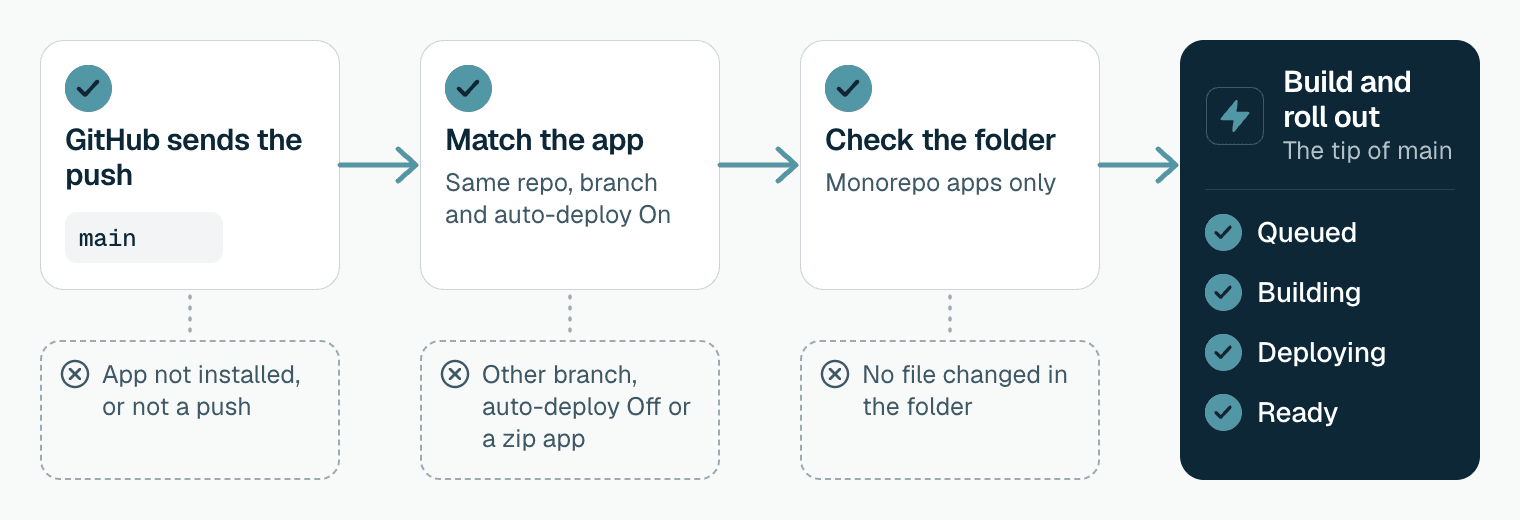
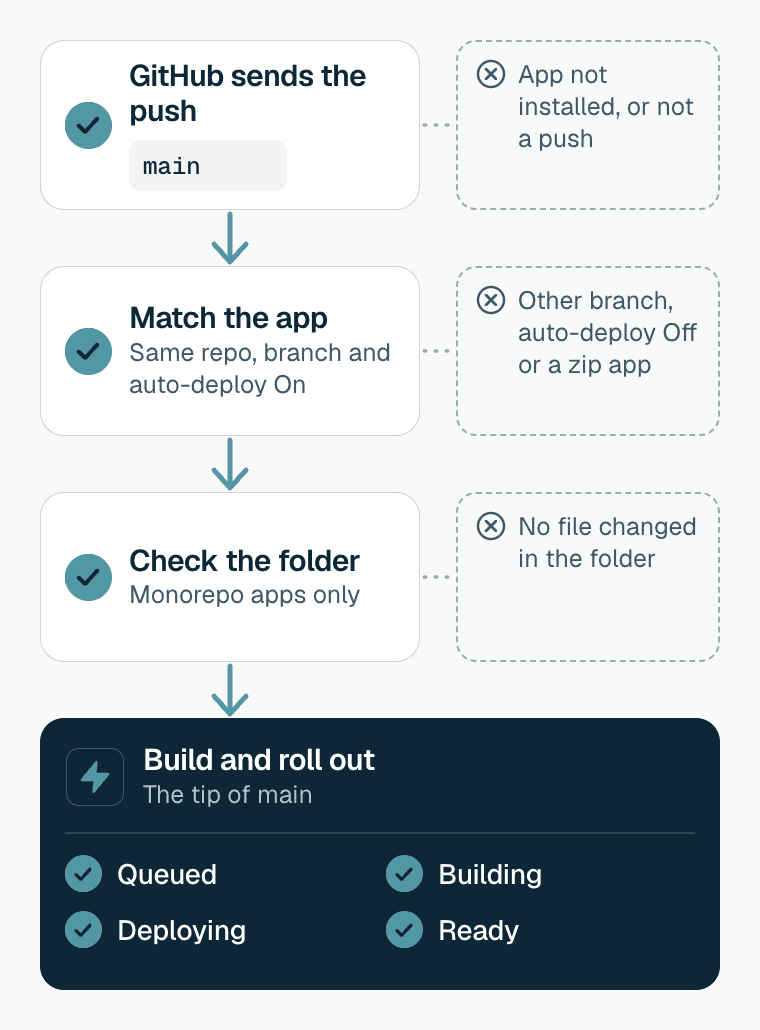
GitHub sends the push to ProductEcho
ProductEcho finds the matching apps
A monorepo push is checked against the folder
The latest commit is built
The new version goes live
The statuses you see are Queued, Building, Deploying and Ready, or Build failed and Deploy failed if a step stops. The Source card on the app's Overview tab shows the repository, the branch, the root directory and whether auto-deploy is on.
The version that is running keeps serving while a new one builds. A failed build leaves it alone, and a newer push replaces an older build that has not finished.
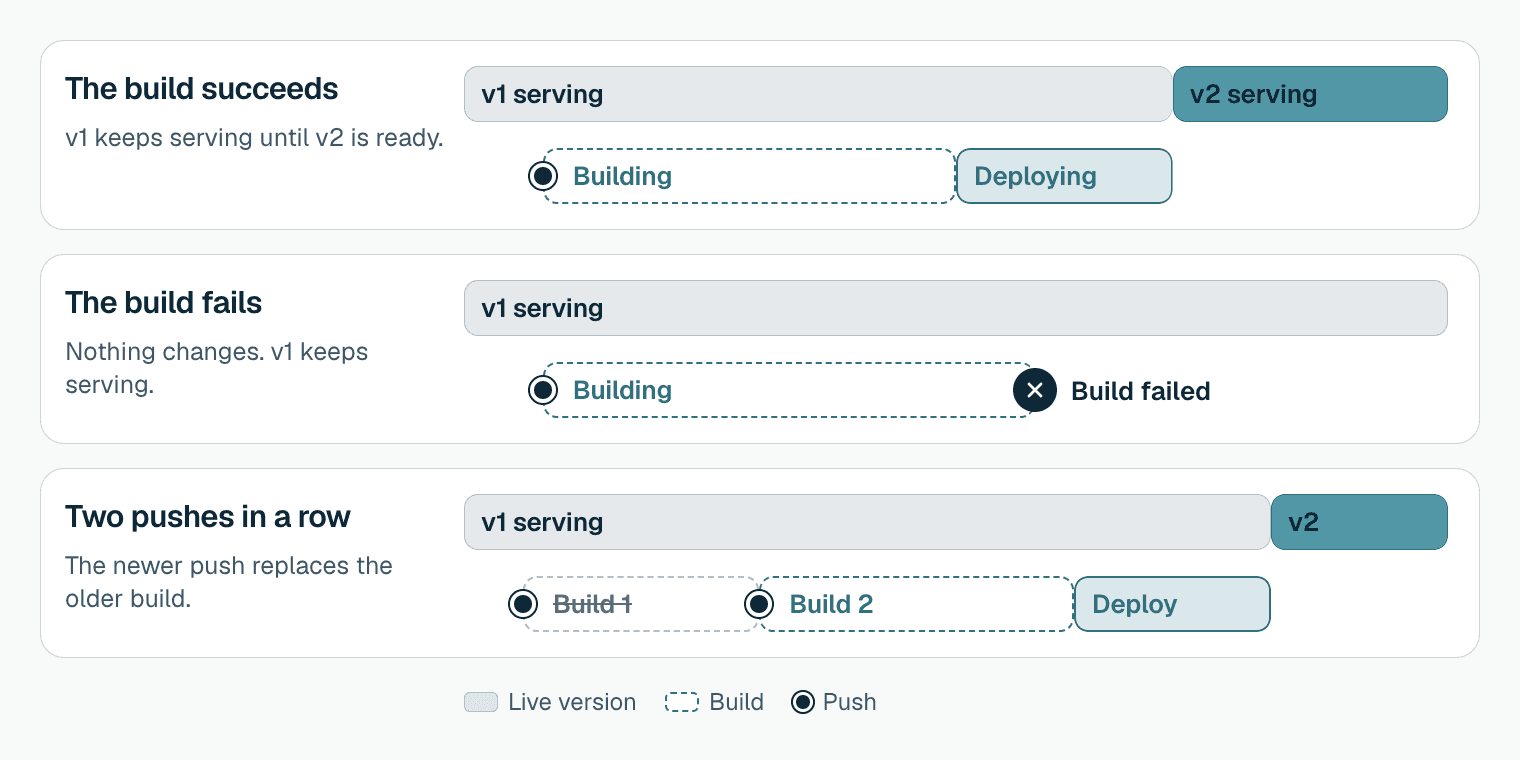
A push tells ProductEcho which branch changed, and the build takes the tip of that branch when it starts. If you push twice in quick succession, the newer push takes over and the result of the older one is discarded.
It builds when the push arrives and does not wait for GitHub Actions or any other check to pass. To deploy only tested code, track a branch that receives merges after your checks pass, such as production.
Redeploy the latest changes by hand
Redeploy pulls the latest commit of the tracked branch and deploys it, whether or not auto-deploy is on. Use it when auto-deploy is off, after you changed a setting, or after a push was skipped or failed.
Open the app
Confirm
Watch the status
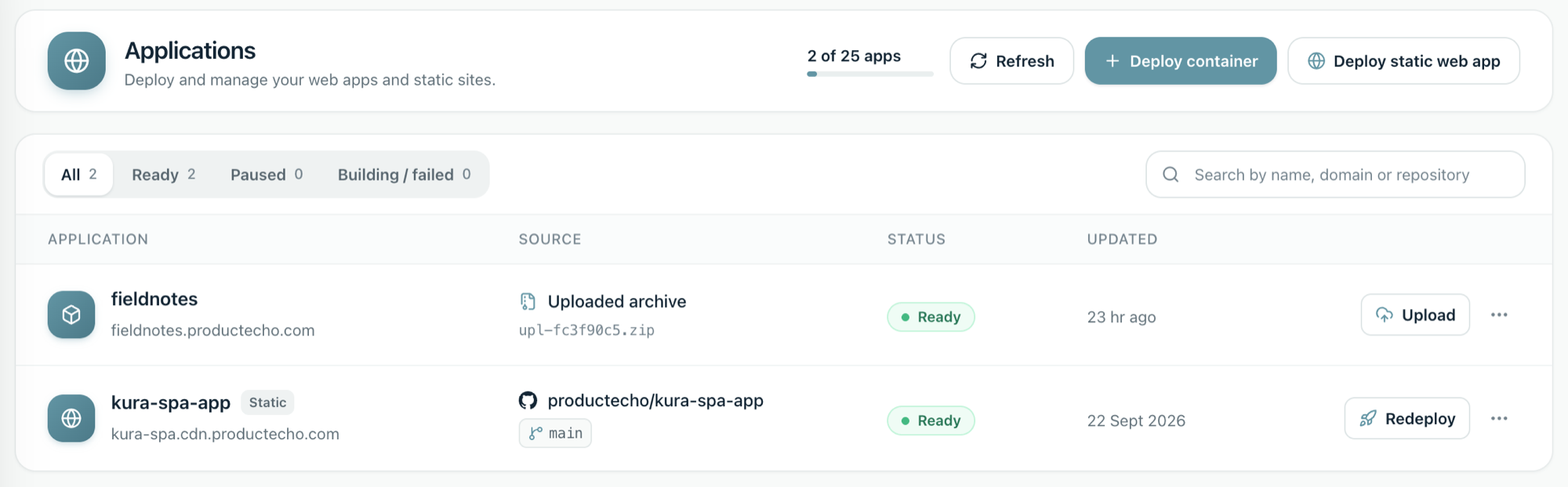
Redeploy reuses everything saved on the app: root directory, port, resources, environment variables and settings. Only the code changes. To change an environment variable without rebuilding, use the Environment tab on the app instead.
Fix the common problems
A push did not redeploy the app
Check these in order:
- The push was to the tracked branch. The Source card shows which one.
- Auto-deploy shows On in the Source card. Apps created with it off, and apps deployed from a zip, do not rebuild on a push.
- For a monorepo app, the push changed a file inside its folder or a shared root file.
- The ProductEcho GitHub App is still installed on the repository. In GitHub, open Settings and then Applications. Removing the app unlinks the connection.
You never add a webhook to the repository yourself: the GitHub App sends the push events, and ProductEcho works out which app to rebuild from the repository and branch. Redeploy latest always works in the meantime. If all four checks pass and pushes still do not rebuild the app, contact us with the app name and the time of the push.
The build failed
The app shows Build failed with the reason from the build. A failed build does not touch the version that is running. Fix the code and push again, or choose Redeploy latest.
The deploy failed
The build worked but the new version did not start. The app shows Deploy failed with the reason. Check that the app listens on 0.0.0.0 and reads the PORT variable, and that its environment variables are set, then redeploy.
The app is Ready but the URL shows an error
Ready means the container started, not that your routes work. A gateway error usually means the app listens on the wrong port. Follow why a deployment returns 502.
ProductEcho cannot read a private repository
The console says ProductEcho GitHub App Access Required until it can read the repository. Install the app on that repository, or grant it access if it is already installed, then connect again.
Going back to an earlier version
There is no one-click rollback. Revert the change in Git and push, and ProductEcho builds the reverted code like any other push.
Questions
Do I need to upload a zip when I deploy from GitHub?+
No. ProductEcho clones the repository itself, so nothing is uploaded from your machine. Code that is not on GitHub is deployed from an uploaded archive instead.
Does it work with private repositories?+
Yes. Install the ProductEcho GitHub App, grant it the repository, and ProductEcho clones it to build. Public repositories work too.
Which branch is built?+
The branch you choose under Git Branch to Track when you create the app, usually main. Pushes to other branches do not trigger a build.
Does a pull request deploy a preview?+
No. ProductEcho reacts to pushes to the tracked branch and ignores other GitHub events, including pull requests.
Does ProductEcho wait for my tests or GitHub Actions?+
No. It builds when the push arrives. To deploy only tested code, track a branch that receives merges after your checks pass.
Can I deploy a monorepo from GitHub?+
Yes. Choose the project folder as the root directory. ProductEcho builds only that folder, and a push counts only when it changes that folder or a shared root file. The guide on deploying one app from a monorepo has the details.
Does it work for static sites?+
Yes. A single-page app built with Vite, React, Vue or Svelte can be deployed from a repository too. Each push builds a new release, and the site switches to it once it checks out.
Can I do this from Claude Code, Cursor or Codex?+
Yes. Give the agent the repository address and the branch, and it deploys from the repository instead of uploading an archive. Each client has its own setup guide.