
Connect an AI-Generated App to Production Data Securely
Where the database password goes, which login your app uses, and what happens when it leaks: five checks for an AI-generated app, each with a 30-second test.
Your agent will see the database password. Plan for that.
When an AI agent connects your app to a database, the password travels further than it does when you paste it yourself. It shows up in a tool result in the chat, in the files the agent writes, in the app's build output, and on the settings page it finally lands on. "Production data" here means your PostgreSQL database, the thing a bug or a leaked password can actually damage.
In July 2025 an AI agent on Replit wiped a production database during a code freeze, as Fortune reported. The lesson that applies to every setup is narrower than "agents are risky": whatever login you give an agent, or an app an agent wrote, is the login a mistake gets to use.
Below are five checks, each with a 30-second test and, where it helps, a prompt to paste into Claude Code, Cursor, or Codex. The SQL was run on PostgreSQL 17. The ProductEcho details are as of October 2026.
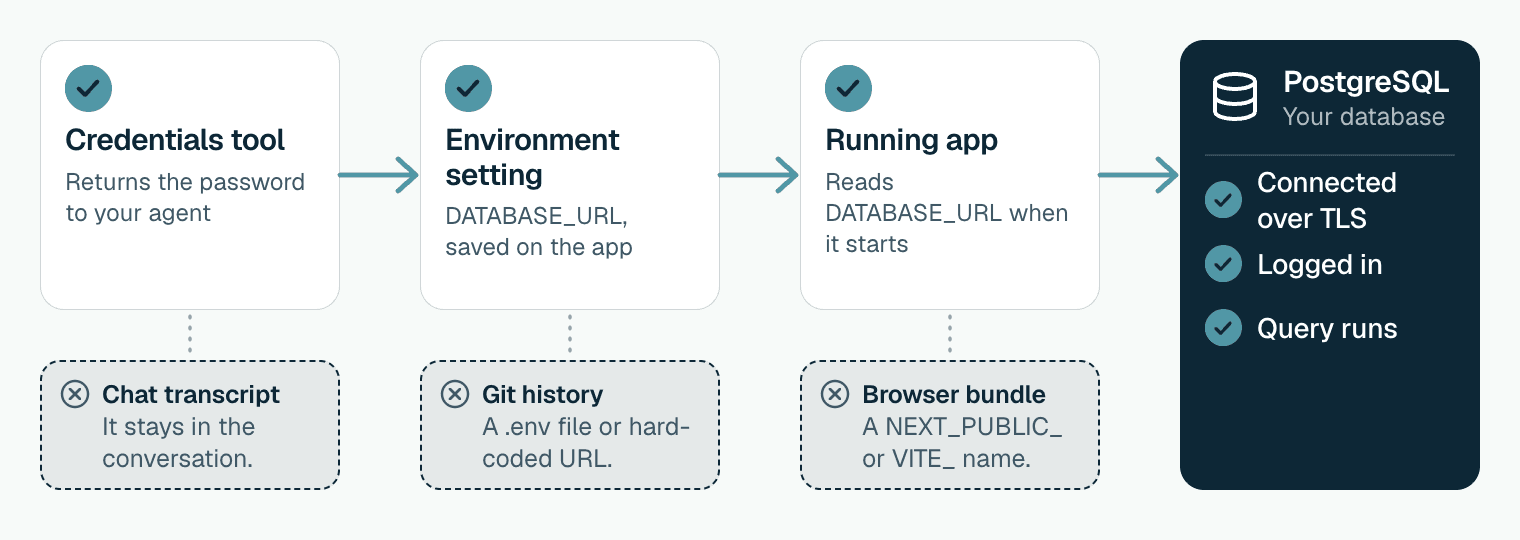
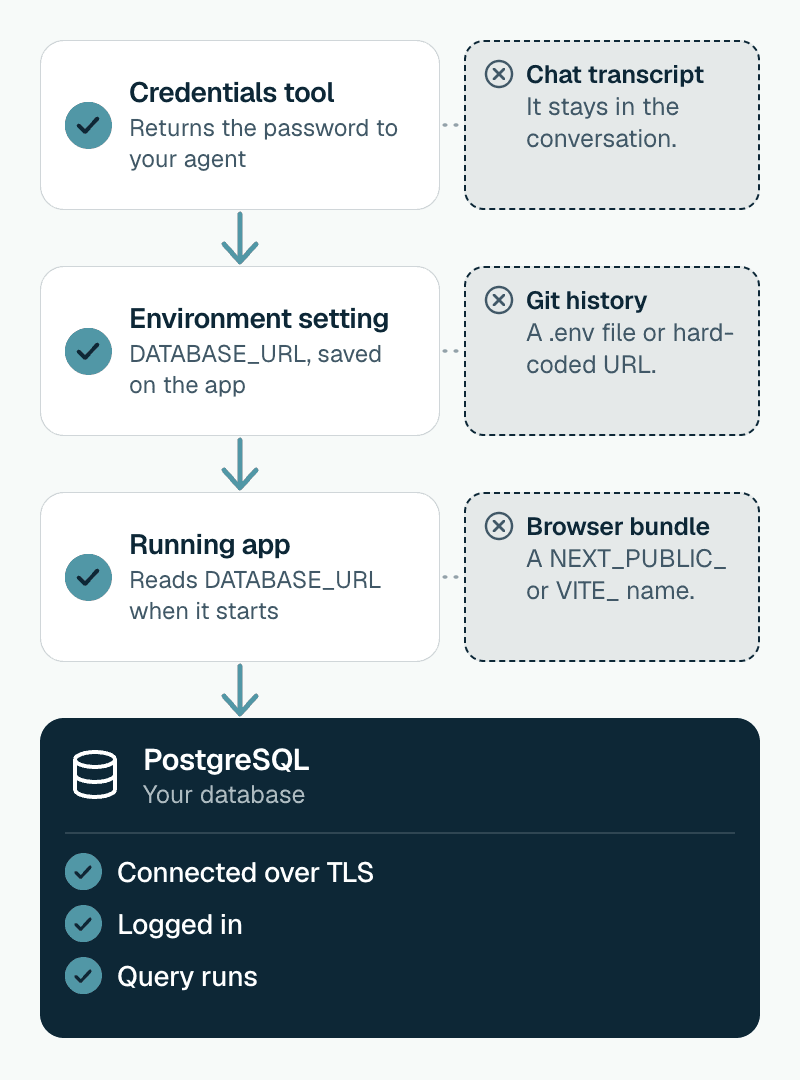
On ProductEcho, the get_postgres_credentials tool returns the password and a ready-made DATABASE_URL, and the usual flow has the agent pass that URL to the app as an environment variable. The tool is marked read-only, so a client may run it without asking you. That is convenient, and it puts the password in your chat. The checks below keep that from costing you.
1. The URL is in your repo or its history
Generated code often hard-codes a connection string "to get it working" or commits a .env file. The Next.js docs say you almost never want to commit these files.
Test: the first command searches the files as they are now. The second lists every commit that ever added or removed a line shaped like a URL with a password, so it also finds one you deleted last week. Ignore placeholders such as user:password. No output from either means clean.
A real hit means the password is already out. Deleting the file does not undo that. Change the password (check 5), then clean up.
2. The browser can read it
Anything a front end can read, every visitor can read. Vite exposes VITE_ variables to client code and warns against putting secrets in them. Next.js inlines `NEXT_PUBLIC_` variables into the JavaScript it sends to the browser. A static site has no server code at all, and ProductEcho serves static sites from a CDN, so one cannot hold a database URL. Put the queries behind an API.
Test: build the app and search the output. No file names printed means the URL is not in the bundle. The folders are .next/static for Next.js, dist for Vite, and build for most others.
3. The app logs in as the owner
A database created through ProductEcho has one login: the user name you gave it at launch, postgres by default. The standard PostgreSQL image makes that login a superuser, and ProductEcho does not add a second, limited one. If the app uses it, so does every bug and every injected instruction in the app.
Test: connect with the app's own URL and run the query below. A t in the second column means the app can drop tables, create logins, and read everything.
The fix is one login per job. The owner keeps migrations and emergencies. The app gets a login that can only work with rows. An optional third login lets your agent look at data without being able to change it.
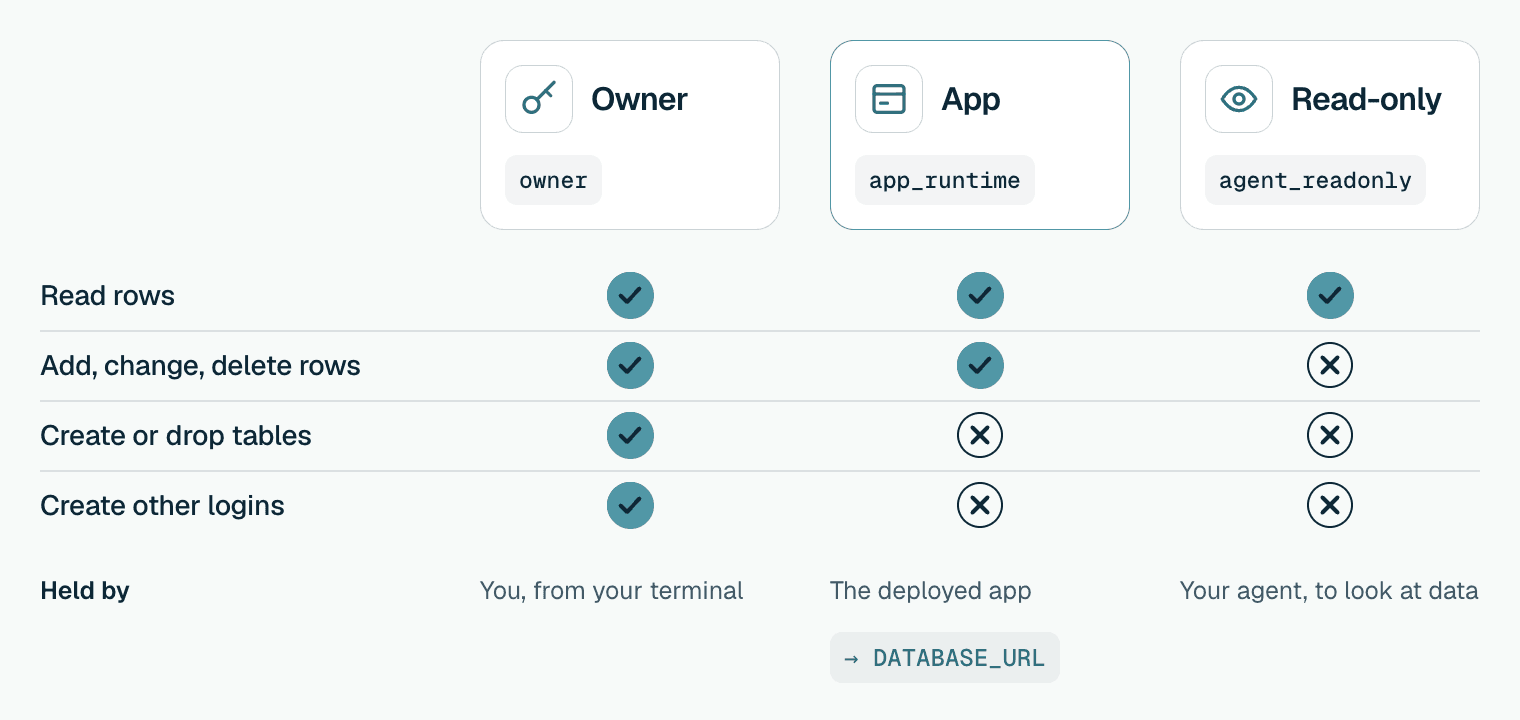
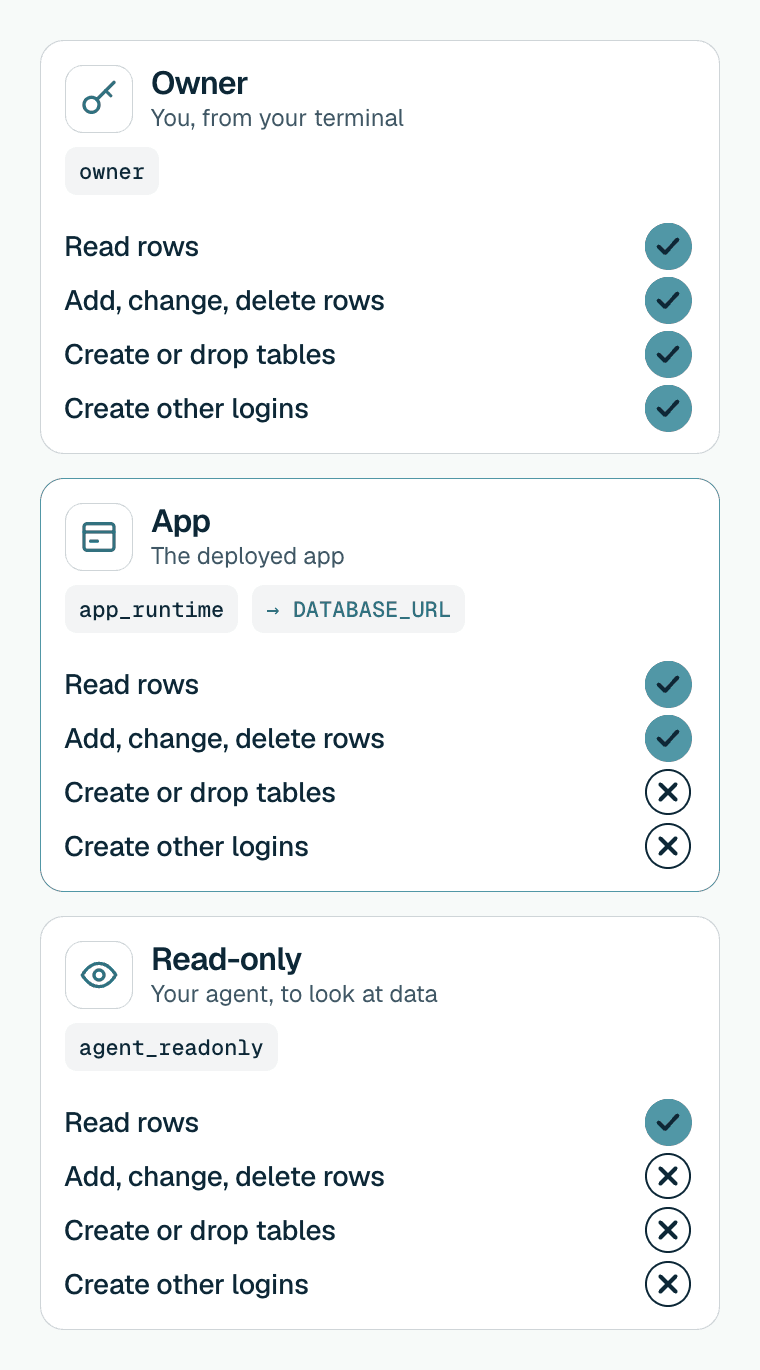
Run this as the owner, from your own terminal, connected to your database. feedback_board is the example database name. Make each password with openssl rand -hex 24, which is safe to put in a URL.
Build the app's URL from the new login: the same host, port, and query string, with app_runtime and its password swapped in. Set it as DATABASE_URL yourself in the console's Environment tab, so the agent never sees it.
In a test on PostgreSQL 17, app_runtime could read and write rows, including in a table a later migration created, and was refused DROP TABLE, TRUNCATE, CREATE TABLE, and CREATE ROLE. agent_readonly could read but not write. The app login can still DELETE FROM any table it may write to, so this limits what a mistake can reach without making mistakes harmless. Scoping each query to the right customer stays your job, as in Vibe Coding to Production.
If your app runs migrations at start-up, it needs the owner login. Run them from your machine or CI with the owner URL instead, so the deployed app never holds it.
4. Does your driver speak the connection URL?
ProductEcho's DATABASE_URL ends in ?sslmode=require&sslnegotiation=direct. TLS 1.2 or newer ends at a shared gateway that routes by host name, and from there the traffic stays on ProductEcho's private cluster network. sslnegotiation=direct is a PostgreSQL 17 client option, so you need psql 17 or newer, or a driver that supports direct TLS. sslmode=require encrypts the connection. verify-full would also check the certificate and host name.
Test: connect once from your terminal and once from the deployed app, and run SELECT 1. In psql, the banner after connecting should read SSL connection. The database's own pg_stat_ssl view reports f, because TLS ends at the gateway, so do not use it as the check.
5. What happens when the password leaks
Two facts about ProductEcho decide this.
First, the password can be read back. get_application_env returns an app's stored environment variables and, like get_postgres_credentials, is marked read-only, so any connected agent with read access can fetch them. The console hides secret-looking values until you reveal them. This is another reason the app's URL should hold the limited login, not the owner.
Second, there is no rotate-password action today. After a leak, change the password in the database and then update the app:
Do the same for the owner login if its password was ever in a chat, and save the new one yourself. The console and get_postgres_credentials show the password stored when the database was created, and they will keep showing it.
Keep your client's approval prompt on for destructive tools. delete_postgres and pause_postgres are marked destructive, so a client can ask before it runs one. Do not turn that off to save a click.
Test: search your agent's session for the owner password. If it is there, change it with ALTER ROLE now.
With the five checks passing, connect your agent and deploy. Pooling and migrations are covered in Connect a Production App to PostgreSQL Safely.