
Core concepts: workspaces, apps, databases and deployments
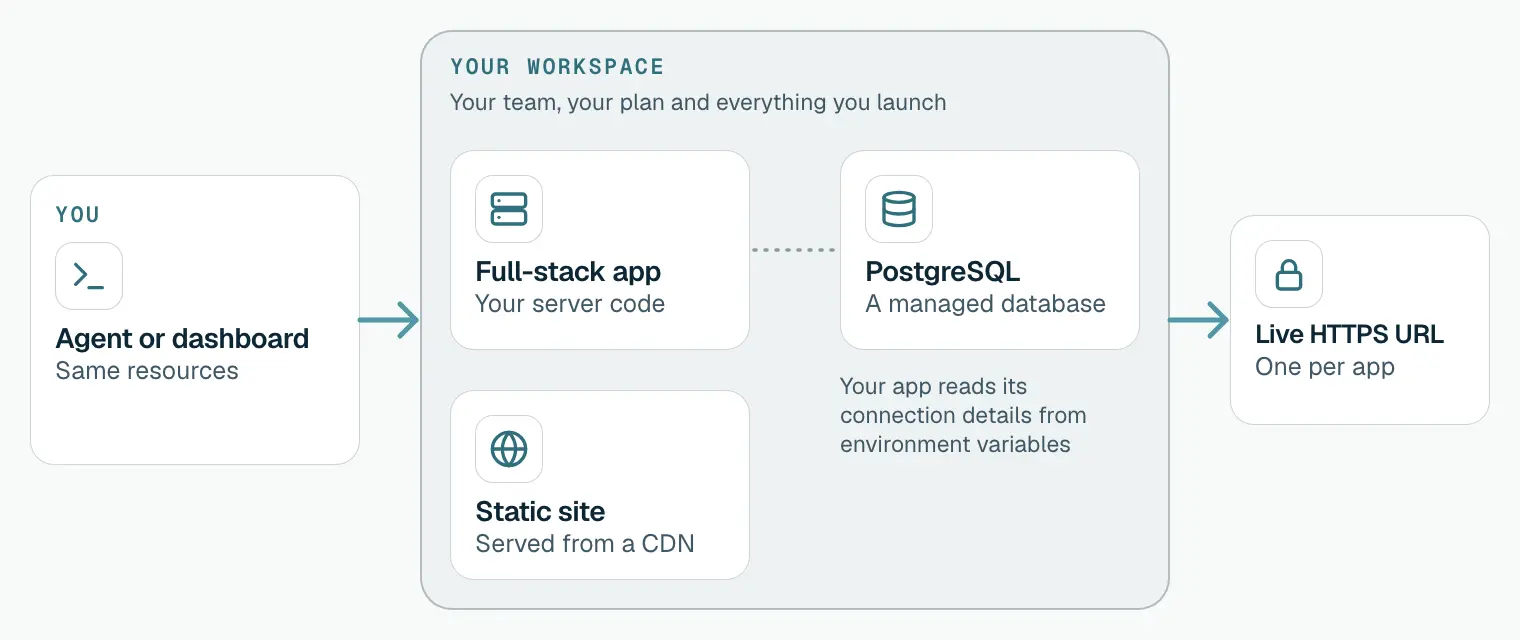
How ProductEcho fits together: a workspace holds your team and everything you launch, apps and databases are resources, and each app gets a live HTTPS URL.
The big picture
ProductEcho is organised around a workspace. Your workspace holds your team and everything you launch: apps, static sites and databases. Your coding agent and the dashboard work on the same resources, so anything one creates, the other can see and change.
Your coding agent
A coding agent is the agent you already use to write code, such as Claude Code, Cursor or Codex. It talks to ProductEcho over MCP, a standard way for agents to use tools. You authorize it once, and it can then launch and manage the same resources you see in the console. Setup is in Connect your coding agent.
Workspace and team
You name your workspace when you sign up. Everyone you invite shares it: teammates see the same apps and databases, and your plan applies to the workspace as a whole.
Invite teammates by email from Team & Security in the console and give each a role: admin, developer or viewer. The same page is where you generate MCP keys for scripts and CI.
Resources
A resource is anything ProductEcho runs for you. These are the ones you will use first.
| Resource | What it is | How it is counted |
|---|---|---|
| Full-stack app | Your server code, running behind its own HTTPS address. | One app |
| Static site | Files served from a CDN, with an HTTPS address and your own domain if you add one. | One app |
| PostgreSQL database | A managed database your app connects to with a connection URL. Encrypted at rest. | One database |
Apps
An app is a full-stack app or a static site, and both count toward your plan's app limit. An app is deployed from an uploaded project, which your coding agent sends, or from a GitHub repository and branch.
The Applications page lists every app with its status, source and last update. A new version moves through Queued, Building and Deploying to Ready. If a step fails, the status shows Build failed or Deploy failed.
Databases
A PostgreSQL database is its own resource, with its own page in the console. Your coding agent creates one when your app needs it, or you create one with New database on the PostgreSQL page. Connections require TLS, and the host, database name, user and password are on the Connect tab of the database.
Your app reads those connection details from environment variables. More in PostgreSQL auto-provisioning.
ProductEcho also runs MySQL and MongoDB databases. You create those from their own pages in the console; your coding agent launches PostgreSQL.
Deployments and live URLs
A deployment puts your code on an app. The first deploy creates the app and its HTTPS address. After that, redeploy by asking your coding agent, by choosing Redeploy in the console, or, for an app connected to GitHub, by pushing to the branch it tracks. The version that is running keeps serving until the new one is ready.
You can put an app on your own domain later. Deploy with a coding agent shows the prompt.
Plans and limits
Your plan sets how many apps, databases, team members and custom domains your workspace can have. The Applications page shows your count, for example 2 of 25 apps. Current limits are on the pricing page, and you can upgrade from Settings & Billing.
Open the Quickstart