
How a deploy works on ProductEcho, from prompt to live URL
What happens between your prompt and a live URL on ProductEcho: the upload or GitHub clone, inspection, build, rollout and each status you see.
The short version
A deploy takes your code, works out what kind of app it is, builds it and runs it at a live HTTPS address. Each step has a status you can see in the console or ask your agent for: Queued, Building, Deploying, then Ready.
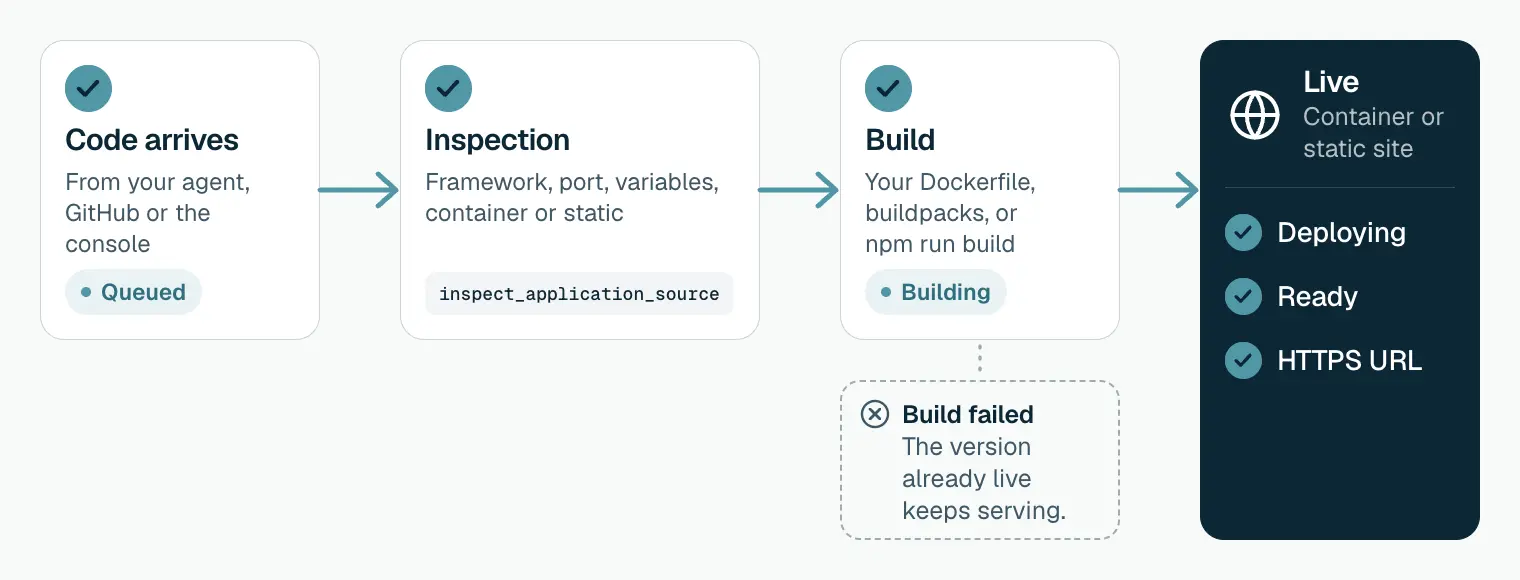
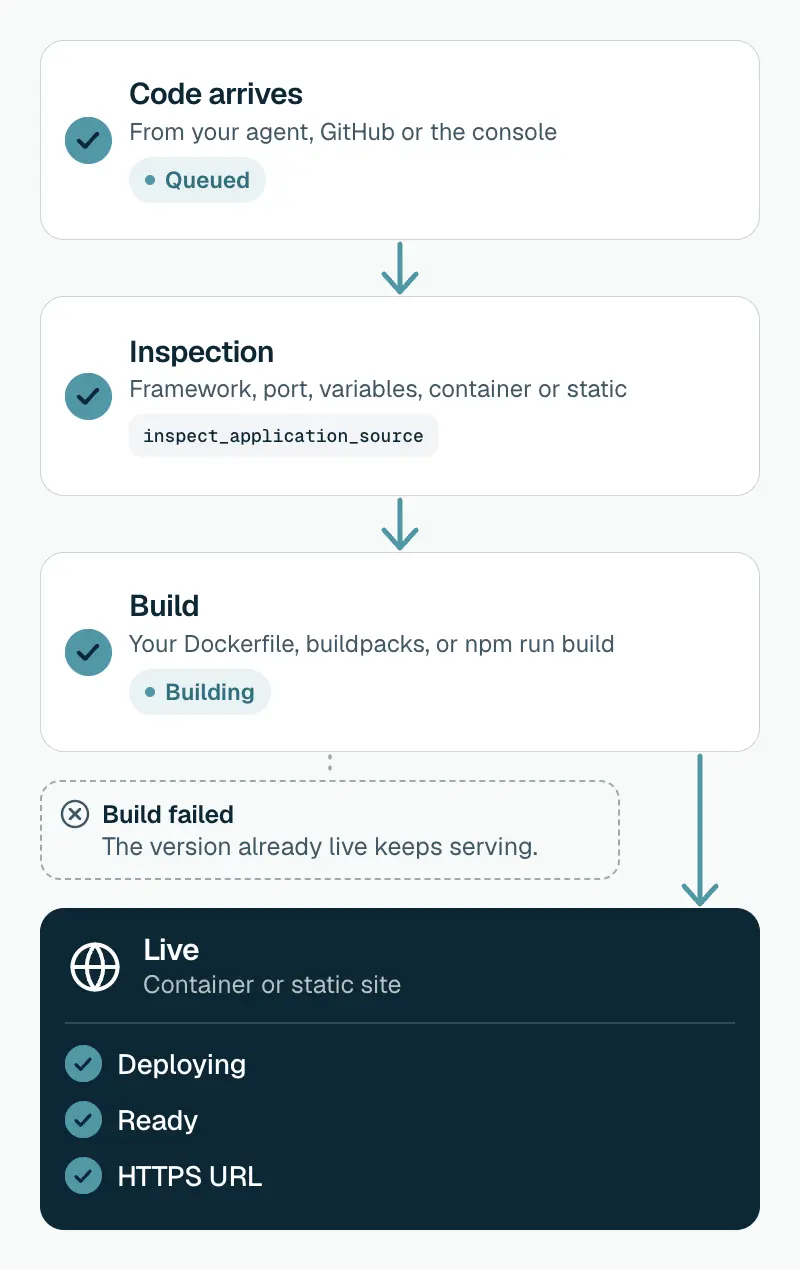
1. Your code arrives
There are three ways in, and all three go through the same steps:
- From your coding agent. The agent packs a clean copy of the project and uploads it. The archive leaves out
node_modules,.git, build output,.envfiles and keys. - From GitHub. ProductEcho clones the branch you chose. With auto-deploy on, every push to that branch starts a new deploy. See Deploy from GitHub.
- From the console. Paste a GitHub link, pick a branch and deploy.
In a monorepo, you or your agent name the folder to deploy. See monorepos for AI-assisted coding.
2. Inspection works out what it is
Before anything is built, ProductEcho reads the project. Your agent runs this check with inspect_application_source. It finds:
- The language and framework, such as Next.js, FastAPI or Spring Boot.
- The port the app listens on. If none is found, a new app uses 8080.
- The environment variables the code expects, so your agent can set them.
- Whether the app runs as a container or as a static site.
3. The build
The status is Building. How the app is built depends on what inspection found:
| Your project | How it is built | Where it runs |
|---|---|---|
| Has a Dockerfile | From your Dockerfile, which wins over automatic detection | Container |
| Node.js, Python, Go, Java and other server apps | Cloud Native Buildpacks (Paketo) detect the language and build an image. No Dockerfile needed | Container |
| Single-page app: Vite, React, Vue, Svelte, Angular | npm run build, then the output files are published | Static site on the CDN, when inspection recommends it |
If the build fails, the status is Build failed and the build log says why. A version that is already live keeps serving. Dockerfile or buildpacks: how to choose.
4. It runs at a live address
The status is Deploying while the new version starts, then Ready.
- A container app gets
https://<app-name>.productecho.com. It must listen on the port inPORTand bind to0.0.0.0. - A static site gets an address on
cdn.productecho.com. - A private app gets no public address. Only the other apps in your workspace can call it. See Private services.
If a container crashes on start or does not start in time, the status is Deploy failed, with the reason.
Every status, and what to do
| Status | What it means | What to do |
|---|---|---|
| Queued | The deploy is waiting to start | Wait |
| Building | The image or the static files are being built | Follow the build log |
| Build failed | The build stopped with an error | Read the build log, fix the cause, deploy again |
| Deploying | The new version is starting | Wait |
| Deploy failed | The new version crashed on start or did not start in time | Read the app's logs, check the port and the start command |
| Ready | The new version started and receives traffic | Open the URL and test it |
| Paused | You paused the app, so it serves nothing | Resume it |
What happens on the next deploy
A new deploy builds a new version while the current one keeps serving. When the new version is Ready, it takes over. If the build fails, the current version stays live.
A change to an environment variable that the build does not use only restarts the app on the build it already has. See environment variables and secrets.
Good to know
- Ready means started, not working. ProductEcho does not call a health route. An app that listens on the wrong port can show Ready and still return a 502, so open the URL after each deploy. See debug a 502 Bad Gateway.
- Going back a version: deploy the earlier code again, by asking your agent or pushing a revert.
- Static hosting is for single-page apps. Only apps built with Vite, React, Vue, Svelte or Angular are published as static sites.
Questions
Do I need a Dockerfile?+
No. Without one, buildpacks detect the language and build the image. With one, ProductEcho builds from your Dockerfile.
What address does my app get?+
A container app gets `https://<app-name>.productecho.com`. A static site gets an address on `cdn.productecho.com`.
Why does my app show Ready but return a 502?+
Ready means the process started. A 502 usually means the app listens on a different port, or only on `127.0.0.1`. Bind to `0.0.0.0` and read the port from `PORT`.
How do I see why a deploy failed?+
Ask your agent to diagnose the app. It calls `diagnose_application` and reads the logs. In the console, open the app's logs.