
Private services: keep an app off the public internet
A private app has no public address. Only your workspace's other apps can call it. Switch an app between private and public in seconds, with no rebuild or restart.
What a private app is
Every app you deploy gets a public address by default, such as shop.productecho.com. Anyone who has the link can open it.
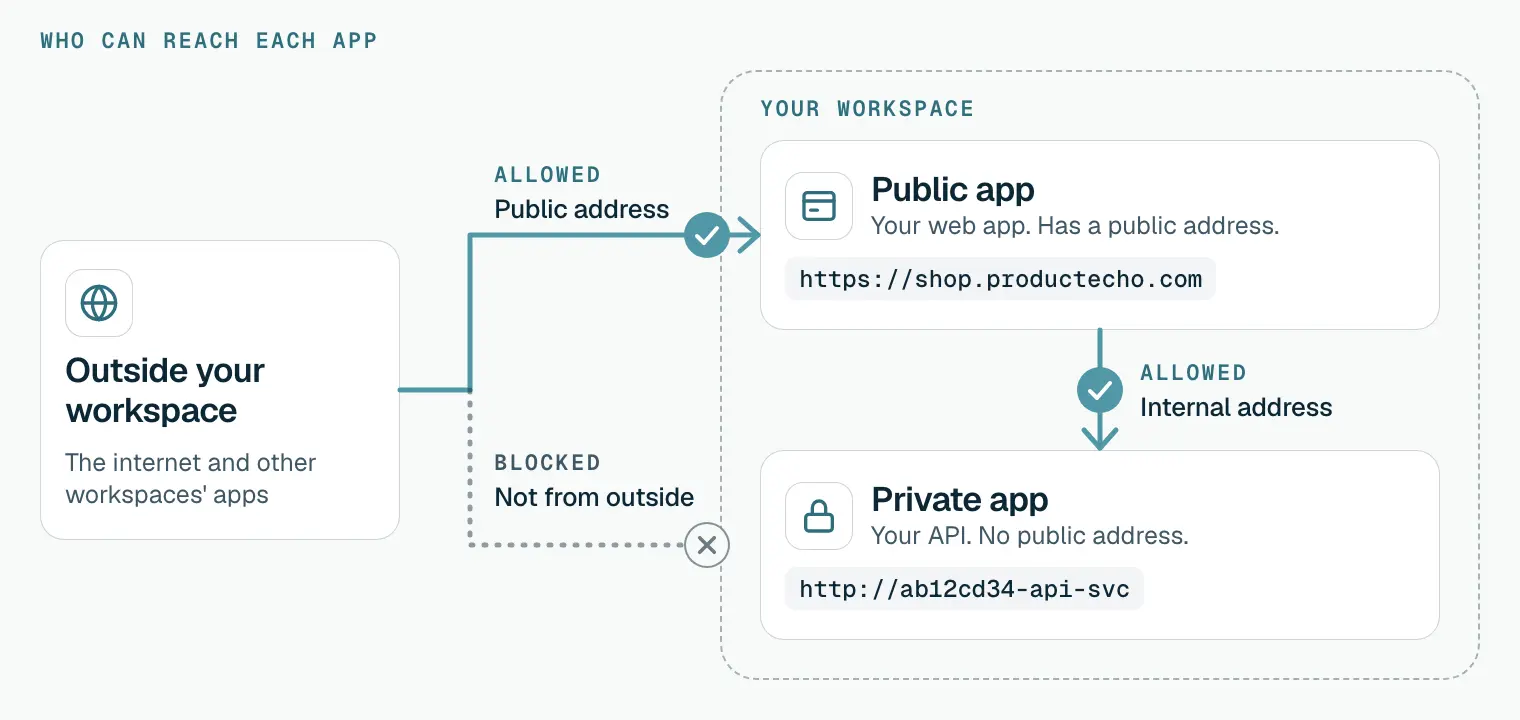
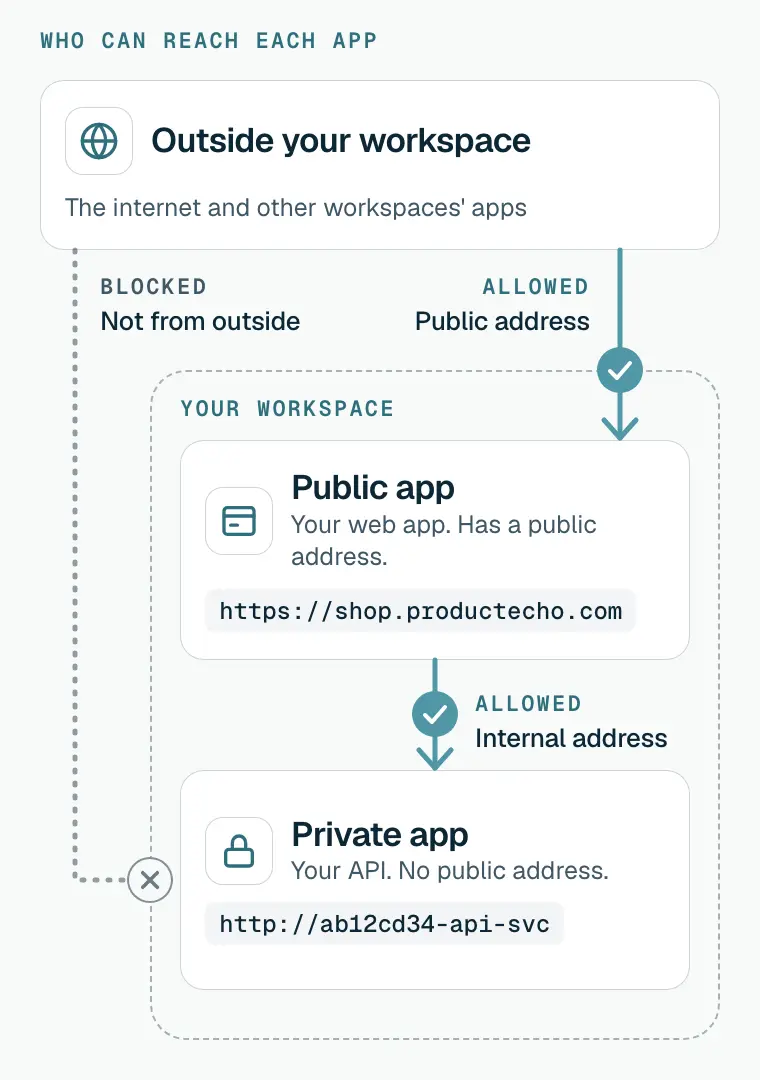
A private app, also called a private service, is the same kind of app with the public address switched off. People on the internet cannot reach it. The other apps in your workspace can still call it, using an internal address that only works inside ProductEcho. Your workspace is the space that holds your apps, databases and team. Core concepts explains it.
| About | Public app (the default) | Private app |
|---|---|---|
| Public address | Yes. An HTTPS address anyone can open. | None. The address is kept for the app but not served. |
| Who can call it | Anyone who has the address. | Only the other apps in your workspace. |
| How they call it | Through its public address. | Through its internal address. |
| Typical use | A website, or an API your customers use. | An API, worker or service behind your public app. |
| Changing it later | Make it private in seconds. | Make it public in seconds. |
Private is a setting on a full-stack app, not a different kind of app. A private app is built and deployed like any other, and it counts toward your plan's app limit.
When a private app helps
Use one for any app that your other apps need and visitors never do:
- An API that only your own web app calls. Nobody else can send requests to it.
- A worker or job runner that your other apps trigger over HTTP.
- An internal tool or admin service that your other apps use.
- One of several small services that together make up a product, with a single public app in front.
A visitor's browser cannot open a private app, and neither can a service outside ProductEcho. A static site or single-page app runs in the visitor's browser, so it cannot call a private app directly. Services such as Stripe or GitHub that send you webhooks need a public address to send to, so keep the app that receives them public. To use a private app from the browser, put a public app in front: its server code calls the private app and returns the result.
How a call reaches a private app
A visitor opens the public app
The public app calls the private app
http://ab12cd34-api-svc/orders.ProductEcho checks where the call comes from
The private app answers
What an internal address looks like
An internal address is http://, then a short code for your workspace, then the app name, then -svc. For an app named api it looks like http://ab12cd34-api-svc. It uses plain HTTP on the default port, so it has no port number and no https://. Copy it from the console or ask your agent for it instead of typing it.
The address only works from inside ProductEcho. Opening it in a browser, or calling it from your own computer, fails.
Make an app private
Choose private when you first deploy an app, or switch an app that is already live. Only full-stack apps can be private. A static site cannot.
Deploy a new app as private
Start a new app
Under Access, choose Private
Deploy, then copy the internal address
Switch an app that is already live
Open the app's Settings tab
Choose Make private
Confirm
Within a few seconds the app shows a lock icon and a Private label in the Applications list.
Or ask your coding agent
To deploy a new app as private:
To switch an app that is already live:
The agent calls deploy_application with is_private set, or set_application_visibility for an app that is live. In another MCP client, leave off the /productecho-plugin:… part and ask in plain language.
Call a private app from another app
Your other apps need the private app's internal address. Give it to them as an environment variable, then call it from server code.
Copy the internal address
Save it in the calling app
API_URL with the address as its value, and choose Save & restart. Do not start the name with NEXT_PUBLIC_, VITE_ or REACT_: frameworks put those values in browser code, and changing one rebuilds the app.Call it from server code
It is a normal HTTP request, so it works the same way in any language. Or ask your agent to wire the two apps together:
The internal address only works inside ProductEcho. On your machine, point API_URL at your local server, such as http://localhost:8000, and set the internal address on the deployed app only.
An environment update replaces the stored list, so make sure your other variables are still there. Environment variables and secrets explains why.
What happens when you switch
- It takes a few seconds. ProductEcho does not rebuild or restart the app, so the app keeps running and its internal address keeps working throughout.
- Going private: the public address stops working at once. A visitor sees a not-found page, or a browser certificate warning over HTTPS, because nothing serves the address any more. Other apps in your workspace keep calling the app as before.
- Going public: the same public address works again within seconds. ProductEcho keeps the address for the app while it is private, so nobody else can take it, and there is no new certificate to wait for. Anyone with the address can then open the app, so check that it does not expose anything meant to stay internal.
- Redeploying keeps the setting. A private app stays private after a redeploy, and a deploy does not change visibility. Use the switch, or ask your agent.
What a private app does not do
- Static sites cannot be private. A static site is served straight to visitors' browsers, so it is always public.
- A private app cannot have a custom domain. To add one, make the app public first. To make an app that has custom domains private, remove the domains first.
- You cannot choose which apps may call it. Every app in your workspace can, and no app outside it can. If an app holds data that not every app in your workspace should read, check who is calling in your own code.
- The setting is for apps. It does not change who can reach your databases or your other resources.
Fix the common problems
The calling app cannot reach the private app
Check four things. The address is copied exactly and starts with http://, not https://. Both apps are in the same workspace. The private app is Ready. The call runs in server code and not in the visitor's browser: a browser cannot reach an internal address, and the usual error is that the name cannot be found.
The old public address shows a not-found page
That is expected for a private app. If visitors need the address again, make the app public.
Make private is refused
The app has custom domains. Remove them on its Domains tab, then try again.
Adding a domain to a private app fails
A private app cannot have a custom domain. Make it public first, then add the domain.
There is no Visibility card or Make private button
A static site has no switch because it is always public. For a full-stack app, only workspace owners, admins and developers can change it.
A webhook never arrives
The service sending the webhook is outside ProductEcho, so it cannot reach a private app. Keep the app that receives webhooks public.
Questions
What is a private service on ProductEcho?+
A full-stack app with no public address. The internet cannot reach it, and only the other apps in your workspace can call it, at an internal address.
Can I make an app private after it is live?+
Yes, and back to public again. It takes a few seconds and does not rebuild or restart the app. Open the app's Settings tab and use the Visibility card, or ask your coding agent.
Can another workspace's app call my private app?+
No. Only apps in your own workspace can reach a private app. Apps in other workspaces and visitors on the internet cannot.
Does making an app private change its address?+
No. ProductEcho keeps the public address for the app while it is private, so making it public again brings back the same address.
Can my static site or single-page app call a private app?+
Not directly. These run in the visitor's browser, and a browser cannot reach an internal address. Put a full-stack app in front of the private one and have its server code make the call.